


Anyone who has worked a personal-injury file knows the stack. A few hundred pages from half a dozen providers, faxed in no particular order, with cover sheets, blank pages, a bill that shows up twice and at least one page that arrived upside down. Before anyone can talk about damages, somebody has to read all of it and turn it into a timeline: when the client was treated, by whom, for what, and what it cost. Then somebody has to turn that timeline into a demand.
CoPO Cited is an app that does the first pass on both. You drop in the records as one PDF and type the date of loss. A few minutes later you have a dated chronology, a billing audit and a list of gaps in treatment. Every entry links back to the page it came from, so checking the work takes seconds instead of a second full read. With the Pro plan, the same case becomes a draft demand letter and a ready-to-send package with the records attached.
What you get back
- A chronology. Each treatment date with the provider, the diagnosis codes (ICD-10), the procedures (CPT), a one-line summary of what the record says and a link to the page or pages it came from.
- A billing audit. Charges by provider and in total. Possible duplicate charges are set aside, charges dated before the accident are listed separately, and insurance statements (EOBs) are not counted as bills.
- Gaps in treatment. Any stretch longer than 30 days with no care, with the provider seen on either side of it.
- A list of pages that need a person. Anything the app could not read reliably is flagged by page number instead of guessed at.
You can save the result as a web page or a PDF, and the billing as a spreadsheet.
A walk through the sample case
The app comes with a 39-page sample file you can open for free, without a subscription or an API key. The client is made up: Jordan Reyes, rear-ended at a red light on March 14, 2025. The records are made up too, but they are put together the way real ones arrive, with fax covers, blank pages, an itemized bill, an insurance statement and one page faxed in upside down.
From those 39 pages the app finds 19 treatment dates across five providers, from the emergency room that evening to a cervical epidural injection on September 9. Along the way it turns up the details that matter in a demand letter:
- A 63-day gap. The last physical therapy visit was May 9 and the next orthopedic visit was July 11. The orthopedic note from July 11 explains why: the patient stopped therapy after improving, and the pain came back. The chronology cites that note, page 13, so you know about the gap and the explanation before the other side asks.
- A duplicate charge. The physical therapy bill lists therapeutic exercise (CPT 97110, $95.00) twice on April 8. The second line is set aside as a possible duplicate.
- A visit from before the accident. A 2023 office visit for low back pain after moving furniture is listed separately as a possible pre-existing condition, and its $180 charge is left out of the totals.
- One page it could not read. The emergency room bill came through as a badly degraded fax. The app says so and points you to the page.
The billing comes out to $12,180.00 as billed after the accident, less the $95.00 duplicate, for $12,085.00 counted.
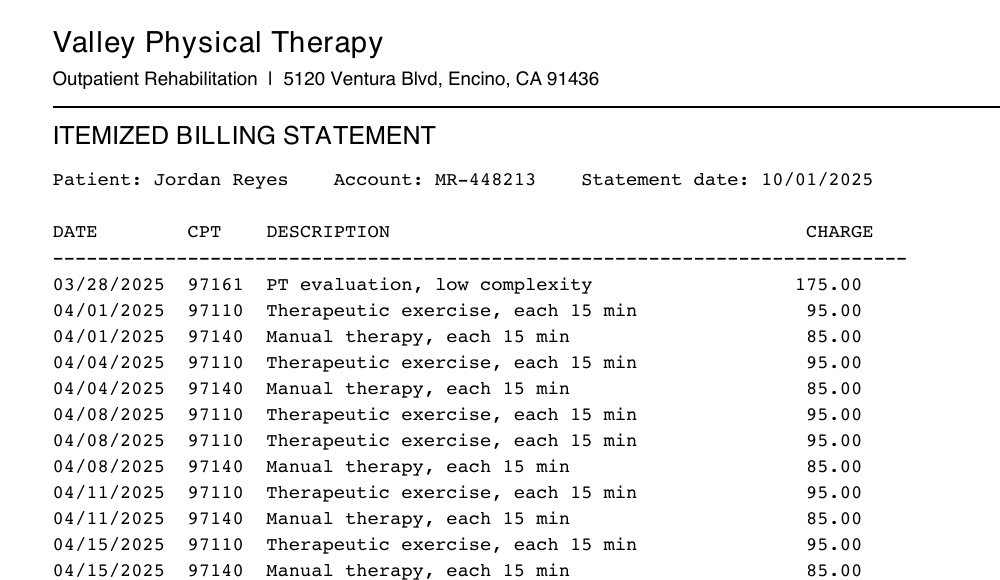
Page 29 of the sample case. The two April 8 lines for the same service are what the chronology flags.
Why every line cites its page
AI tools that summarize records are fast, and they can be wrong in ways that are hard to spot. A date is off by a month, or a charge gets attached to the wrong visit, and nothing about the summary looks wrong. CoPO Cited is built around making that kind of mistake easy to catch.
The AI reads one page at a time and reports only what is printed on that page. The app then checks every date, code and dollar amount it reported against the text of the page. Anything that does not match is flagged. The arithmetic is done by the app, not the AI: putting visits in order, adding up charges, spotting duplicates and measuring gaps. And because each entry carries its page number, clicking it opens that page of the records right inside the app.
Demand letters (Pro)
The Demand letter tab turns a checked case into a draft. You fill in what the records don’t contain: the insurer, adjuster and claim number, how the accident happened, lost wages and the amount you are demanding. Claude writes the narrative from the chronology: the facts, the injuries and treatment with record citations, recommended future care and the effect on the client’s life.
Every number in the letter comes from the app, not the AI. The medical expenses table by provider, the totals, lost wages, the special damages and the response deadline are filled in from the billing audit and your form, so the letter can never disagree with the chronology. The draft leaves out records from before the accident and tells you so; whether to address them is the attorney’s call.
Edit the draft in place, then save it as a Word document or as a demand package: one PDF with the letter followed by the records, each page stamped “Rec. p.” with the page number the letter cites, and bookmarks for each provider. You can also track liens for the case, kept out of the letter.
Where your records go
CoPO Cited runs on your Mac. Scanned pages are read with the text recognition built into macOS. To read each page and draft letters, the app sends text to Anthropic, the company that makes the Claude AI models, using your own Anthropic API key and your own Anthropic account. It asks for your agreement before it sends anything.
The records go from your Mac directly to Anthropic. They do not pass through our servers, and we never see your records, your key or your results. The app has no accounts, ads or tracking. Before you use it on real client files, confirm that your agreement with Anthropic meets your confidentiality and HIPAA obligations.
What it costs
There are two plans through the Mac App Store, both with no limit on cases:
- CoPO Cited, $24.99 a month or $149.99 a year: chronologies, billing audit, gaps in treatment, and web page, PDF and spreadsheet exports.
- CoPO Cited Pro, $69.99 a month or $599.99 a year: everything in CoPO Cited, plus demand letters and demand packages.
The AI reading is billed by Anthropic to your own account, and it usually comes to one to two cents a page with the recommended model. The 39-page sample costs well under a dollar to run. The app shows the estimated cost after every case and keeps a running total, so there are no surprises on the Anthropic bill.
What it is not
CoPO Cited gives you a first draft for a person to check, not a finished work product. Results come from an AI model and automated checks, and they can contain errors or miss things. That is why every entry links to its source page and why unreadable pages are flagged instead of filled in. Demand letters are drafts for an attorney to review, edit and sign. The app does not give legal or medical advice.
Try it
Download CoPO Cited from the Mac App Store and open the sample case. It is free, needs no key and takes a minute to look through. You can see more on the CoPO Cited page.


